Comparing Odoo and QuickBooks
From accounting to automation, Odoo leads the transformation

Accounting has often been viewed as a dull part of business, but as a company grows, it becomes one of the most vital departments for success. That’s why giving accountants the right tools to track financial data is essential for an organization’s financial well-being.
There are many accounting software options available, each offering key features and reports. But how do you choose the right one? The best solution is software that integrates with other business tools, saving both time and resources.
This page compares two major players in the market: Odoo and QuickBooks. To help you decide, we’ve created a comparison table based on key accounting areas: General Accounting, Accounts Receivable, Accounts Payable, Bank and Cash, Extras, and Reporting—covering everything a business needs to manage its finances. We’ve also included details on pricing and usability for each platform. For a quick comparison between Odoo Accounting and Quickbooks please check official whitepaper from Odoo Website.

Overview of the core differences between Odoo and QuickBooks

Evaluation of financial features like invoicing, budgeting, and multi-currency

Analysis of automation tools and smart functionalities

Comparison of language and country support for global usability

Review of user experience, customization, and mobile access

Comparison of pricing models and customer support options
What is Odoo?
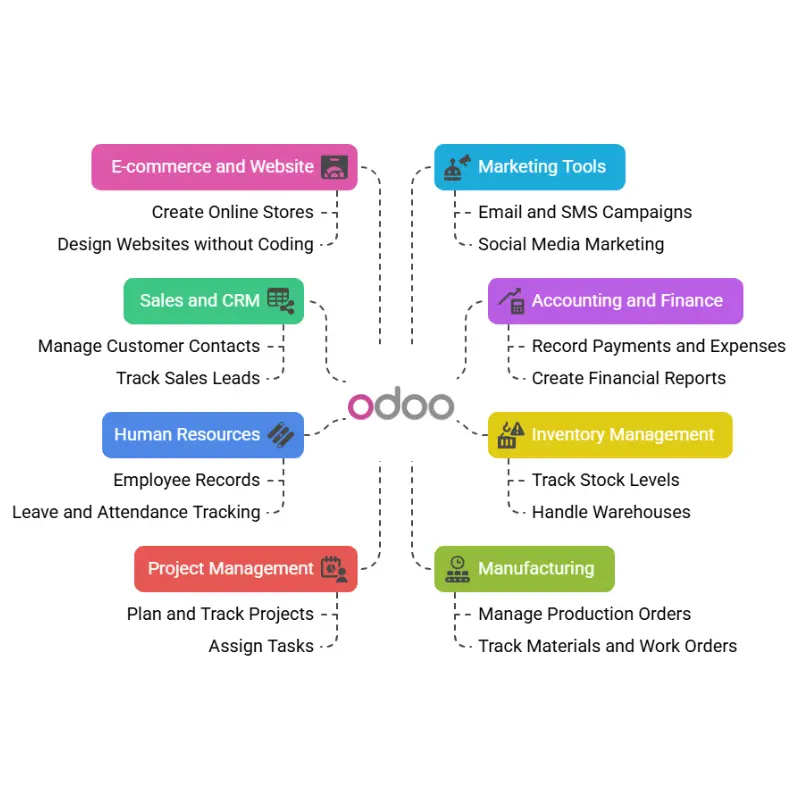
Odoo is a business management software that helps companies run their daily tasks in one place. It is known as an ERP (Enterprise Resource Planning) system. This means it brings together different parts of a business—like sales, accounting, inventory, and more—into one easy-to-use system.
Odoo is used by many businesses around the world because it is flexible, affordable, and can be used by small, medium, or large companies. It is available in two main versions:
Odoo Community (free and open-source)
Odoo Enterprise (paid, with more features and support)
What is QuickBooks?
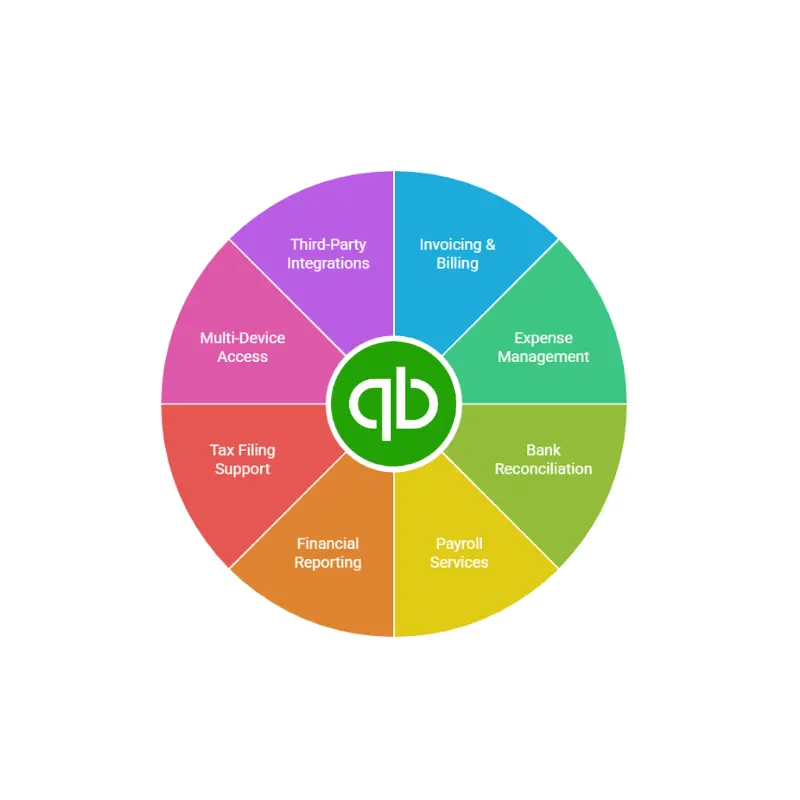
QuickBooks, created by financial software company, is a widely-used accounting solution tailored for small and medium-sized businesses. In 2014, Intuit introduced industry-specific versions to make the platform more appealing and relevant to different business needs. Today, QuickBooks stands as one of the most popular accounting tools in the United States.
The software comes in two main versions: QuickBooks Enterprise and QuickBooks Online. While the Enterprise edition can be accessed locally or through hosted services, this comparison will focus on the features of QuickBooks Online Essentials.
Comparison Points: Odoo vs Quickbooks
General Information
Features
Type
Odoo
Open Source ERP
QuickBooks
Proprietary Accounting Software
Why It Matters
Determines flexibility, customization, and cost of ownership.
Scope
All-in-one business suite
Primarily Accounting
Impacts whether you need multiple tools or just one platform.
Target Audience
SMEs to Large Enterprises
Small to Medium
Businesses
Helps you assess if the software scales with your business size.
Languages & Countries Supported
Features
Supported Languages
Odoo
85
QuickBooks
5
Why It Matters
Determines flexibility, customization, and cost of ownership.
Payment Options
80+
1
Important for businesses operating internationally or planning to expand.
Multi-Currency & Consolidation
Features
Multi-Currency
Odoo
✅ Yes
QuickBooks
✅ Yes
Why It Matters
Crucial for international transactions.
Consolidation
✅ Yes
❌ No
Important for businesses with multiple entities needing financial consolidation.
Chart of Accounts
Features
Multi-Company Support
Odoo
✅ Yes
QuickBooks
❌ No
Why It Matters
Essential for managing multiple legal entities under one system.
Multiple Charts
✅ Yes
❌ No
Useful for businesses operating in different regions with different regulations.
Customer Invoicing
Features
Recurring Invoices
Odoo
✅ Yes
QuickBooks
✅ Yes
Why It Matters
Saves time with subscriptions or ongoing services.
Multi-Step Payment Terms
✅ Yes
❌ No
Helps with flexible or staggered customer payments.
Taxes Per Line
✅ Yes
❌ No
Important for jurisdictions with varied tax rules on individual items.
Customer Follow-Ups
Features
Auto Payment Follow-Ups
Odoo
✅ Yes
QuickBooks
❌ No
Why It Matters
Reduces manual effort and speeds up collections.
Customer Statement Emails
✅ Yes
✅ Yes
Useful for regular updates to customers about their account status.
Vendor Bills
Features
AI-Powered OCR
Odoo
✅ Yes
QuickBooks
❌ No
Why It Matters
Saves time by auto-reading and inputting bill data.
Purchase Agreements
✅ Yes
❌ No
Streamlines procurement and vendor negotiation.
Landed Costs
✅ Yes
❌ No
Helps accurately calculate product costs, especially in imports.
Bank Reconciliation
Features
Automatic Matching
Odoo
✅ Yes
QuickBooks
✅ Yes
Why It Matters
Speeds up the reconciliation process.
Manual Matching
✅ Yes
✅ Yes
Allows manual adjustments when auto-match fails.
Smart Suggestions
✅ Yes
❌ No
Enhances accuracy and efficiency of reconciliation.
Budget Management
Features
Budget Setup
Odoo
✅ Yes
QuickBooks
✅ Yes
Why It Matters
Key for financial planning and control.
Budget Reports
✅ Advanced
✅ Basic
Determines how detailed and insightful your financial reviews will be.
Reporting
Features
Custom Dashboards
Odoo
✅ Yes
QuickBooks
❌ No
Why It Matters
Helps visualize metrics tailored to your business.
KPI Reporting
✅ Yes
❌ No
Tracks key performance indicators crucial for decision-making.
Pivot Tables
✅ Yes
❌ No
Allows deep data analysis and insight discovery.
User Experience
Features
Interface Style
Odoo
Modern Web UI
QuickBooks
User-friendly, Simple
Why It Matters
Affects user productivity and learning speed.
Learning Curve
Medium
Low
Determines training time needed for teams.
Customization
High
Low
Important for tailoring the software to specific workflows.
Mobile Access
Features
Mobile App
Odoo
✅ Yes
QuickBooks
✅ Yes
Why It Matters
Enables work on-the-go.
Mobile Features
Full ERP Access
Accounting only
Affects what operations can be done remotely.
Support & Helpdesk
Features
Support Channels
Odoo
Email, Phone (Enterprise)
QuickBooks
Chatbot, Phone Callback
Why It Matters
Impacts how quickly and effectively issues can be resolved.
Community Support
✅ Strong Open Source
❌ Limited
Enables peer support and access to shared customizations.
Pricing Model
Features
Free Plan
Odoo
✅ Community Edition
QuickBooks
❌ No
Why It Matters
Reduces costs for startups or small teams.
Paid Plans
Per App/User
Tiered Monthly Subscriptions
Affects scalability and long-term budgeting.
Customizable Pricing
✅ Yes
❌ No
Gives flexibility to pay for only what you need.
Why Odoo is Better Than Quickbooks?

All-in-One Platform
Odoo offers a complete ERP solution with over 80 fully integrated business apps, allowing you to manage accounting, CRM, HR, inventory, and more from a single platform. QuickBooks, by contrast, is primarily focused on accounting, requiring external integrations for broader business management, which can lead to inefficiencies.

Scalability
Odoo is designed to scale with your business. You can begin with basic modules and add more as your company grows, avoiding disruption. QuickBooks is ideal for startups or small businesses, but its limited functionality may force a costly system migration when your operations become more complex or large-scale.

Customization
Being open-source, Odoo allows deep customization to meet specific workflow requirements and industry needs. Developers can adapt the system to fit exact business processes. QuickBooks offers predefined features with limited flexibility, which may not support unique business cases or evolving operational demands as your company develops.

Global Capabilities
Odoo supports over 85 languages and has accounting localizations for more than 80 countries, making it ideal for international operations. It handles multi-currency and tax rules globally. QuickBooks, however, is mainly designed for U.S. markets and supports only a handful of languages and country-specific compliance features.
Advanced Features
Odoo provides advanced tools like automated payment reminders, AI-based bill recognition, smart bank reconciliation, and landed cost calculations. These features enhance accuracy and efficiency. QuickBooks lacks many of these capabilities, which can result in manual work, slower processes, and higher chances of error in financial operations.

Better Integration
Odoo integrates all business functions—sales, purchase, inventory, HR, and more—into a unified system, streamlining data flow and decision-making. QuickBooks generally requires third-party apps for such integration, which can introduce data silos, additional costs, and compatibility issues between various software components.

Reporting & Dashboards
Odoo includes real-time dashboards, KPI tracking, pivot tables, and fully customizable reports, giving users detailed insights. It supports data-driven decisions across departments. QuickBooks offers standard financial reports with limited customization, which may not meet the complex reporting needs of growing businesses or diverse industries.

Cost Efficiency (Long-Term)
Odoo offers flexible pricing based on the number of apps and users, and its Community edition is free. This makes it cost-effective in the long run. QuickBooks may appear cheaper initially, but costs rise with add-ons and higher-tier plans, especially as business needs increase.
Multi-Company & Multi-User Support
Odoo supports managing multiple companies within a single environment and allows role-based access control for numerous users. This is essential for firms with subsidiaries or departments. QuickBooks has limited support for multi-company setups and user roles, which can hinder collaborative or large-scale operations.
Future-Proof
Odoo continuously evolves with new modules, features, and updates to support digital transformation and modern business needs. It can adapt to emerging technologies and growing user demands. QuickBooks may not keep up with such flexibility, often requiring a complete platform shift when a business outgrows its features.
Our Next Comparison Page