Don’t just track—transform the way you work
In-Depth Comparison of Odoo and Zoho Books
Accounting today goes beyond data entry, ledgers, and number crunching. With rapid advances in technology—such as automation, AI, RPA, machine learning, and data analytics—the field is evolving to meet modern business needs. These innovations are driving digital transformation across industries.
A key trend is the growing shift to ERP systems, which integrate accounting with other business functions like inventory, sales, and manufacturing. As a result, demand for accounting software—whether cloud-based or locally installed—is expected to rise significantly.
This analysis compares two leading accounting solutions: Odoo 17 and Zoho Books.

Comprehensive feature-by-feature comparison between Odoo and Zoho Books

Highlighting key advantages of Odoo in real-world business use

Identifying missing functionalities in Zoho Books that Odoo provides

Evaluating accounting, inventory, CRM, and automation tools

Comparing flexibility, scalability, and customization options

Guiding businesses in choosing the right ERP based on needs
What is Odoo?
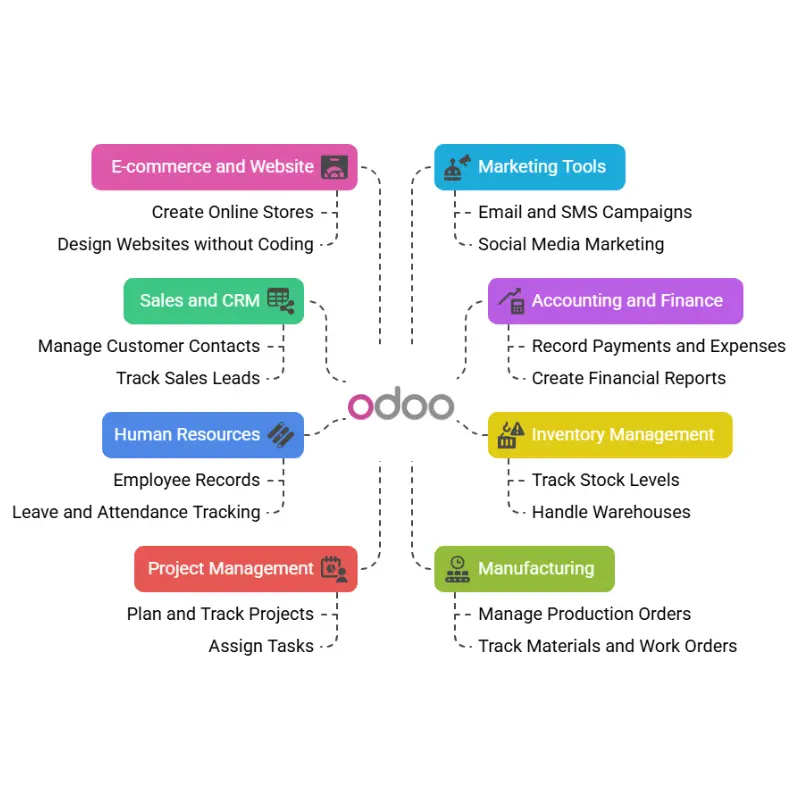
Odoo is a business management software that helps companies run their daily tasks in one place. It is known as an ERP (Enterprise Resource Planning) system. This means it brings together different parts of a business—like sales, accounting, inventory, and more—into one easy-to-use system.
Odoo is used by many businesses around the world because it is flexible, affordable, and can be used by small, medium, or large companies. It is available in two main versions:
Odoo Community (free and open-source)
Odoo Enterprise (paid, with more features and support)
What is Zoho Books?
Zoho Books is a cloud-based accounting software designed to help businesses manage their finances efficiently. It offers a wide range of features, including expense tracking, bank reconciliation, time tracking, project management, invoicing, workflow automation, GST compliance, and more.
Users can access all Premium plan features during the 14-day free trial after signing up. Zoho Books is available in six subscription tiers: Free, Standard, Professional, Premium, Elite, and Ultimate.

Odoo vs Zoho Books: Feature Comparison Table
General Accounting
Features
Double-entry bookkeeping
Odoo
✔
Zoho Books
✘
Why It Matters
Ensures accurate financial tracking with balanced accounts.
Multi-currency support
✔
✔
Allows transactions in different currencies for global business.
Accrual & cash basis
✔
✔
Supports both cash-based and accrual accounting systems.
Consolidated journals
✔
✘
Combines journals from multiple sources into one report.
Custom chart of accounts
✔
✔
Lets businesses design financial structure as needed.
Accounts Receivable
Features
Customer invoicing
Odoo
✔
Zoho Books
✔
Why It Matters
Essential for billing clients and managing receivables.
Recurring invoices
✔
✔
Automates repeat billing, reducing manual work.
Payment terms
✔
✔
Sets due dates and terms for customer payments.
Partial payments
✔
✔
Accepts split or installment payments from customers.
Credit notes
✔
✔
Adjusts customer balances for returns or discounts.
Customer statements
✔
✔
Summarizes customer transactions and outstanding balances.
Accounts Payable
Features
Vendor bills
Odoo
✔
Zoho Books
✔
Why It Matters
Tracks bills from suppliers for accurate payables.
Recurring vendor bills
✔
✘
Automates billing for regular expenses.
Vendor credit notes
✔
✔
Manages vendor refunds or billing adjustments.
Payment terms
✔
✔
Manages when vendor payments are due.
Expense reimbursement
✔
✔
Handles staff reimbursements for approved expenses.
Bank & Cash Management
Features
Bank reconciliation
Odoo
✔
Zoho Books
✔
Why It Matters
Matches bank records with books to ensure accuracy.
Import bank statements
✔
✔
Saves time by importing transactions automatically.
Cash register management
✔
✘
Manages and tracks petty cash and daily operations.
Batch payments
✔
✘
Pays multiple vendors in a single transaction.
Reporting
Features
Profit & Loss statement
Odoo
✔
Zoho Books
✔
Why It Matters
Shows business income and expenses over time.
Balance sheet
✔
✔
Displays financial position including assets and liabilities.
Cash flow report
✔
✔
Tracks money coming in and going out.
Customizable reports
✔
Limited
Enables tailored reports for better business decisions.
Tax reports
✔
✔
Helps with tax filings and compliance.
Inventory & Warehouse
Features
Real-time inventory sync
Odoo
✔
Zoho Books
✘
Why It Matters
Keeps stock levels updated across locations instantly.
Multi-warehouse support
✔
✔ (limited)
Manages inventory across several warehouses.
Barcode scanning
✔
✘
Speeds up stock movement and inventory updates.
CRM Integration
Features
Native CRM module
Odoo
✔
Zoho Books
Requires Zoho CRM
Why It Matters
Integrated CRM without needing separate app.
Lead-to-cash workflow
✔
Partial
Tracks sales from first contact to payment.
Custom pipeline views
✔
✔
Visualizes sales stages for easier tracking.
Sales Management
Features
Quotations
Odoo
✔
Zoho Books
✘
Why It Matters
Sends formal price offers to potential customers.
Sales orders
✔
✔ (limited)
Confirms and tracks customer orders.
Online signatures
✔
✘
Speeds up contract approvals and order confirmation.
Upsell/cross-sell alerts
✔
✘
Suggests additional products to increase sales.
Purchase Management
Features
Purchase orders
Odoo
✔
Zoho Books
✔
Why It Matters
Manages buying process and order tracking.
Vendor price lists
✔
✘
Tracks different vendor pricing for better decisions.
Request for quotations
✔
✘
Requests price estimates from multiple suppliers.
Document Management
Features
Attach documents to records
Odoo
✔
Zoho Books
✔
Why It Matters
Keeps related files linked to records.
Document approval workflow
✔
✘
Adds control over document handling and access.
Document version control
✔
✘
Tracks changes and versions of documents.
Project & Timesheets
Features
Integrated projects
Odoo
✔
Zoho Books
✘
Why It Matters
Combines project tracking with accounting.
Timesheet billing
✔
✘
Converts time worked into billable invoices.
Project profitability
✔
✘
Measures revenue vs. cost for projects.
Analytic Accounting
Features
Cost center tracking
Odoo
✔
Zoho Books
✔ (limited)
Why It Matters
Monitors department or team expenses.
Multi-level analytic tags
✔
✘
Adds detailed categories for cost tracking.
Budgets & forecasting
✔
✘
Helps plan and control future spending.
Automation & Workflows
Features
Automated journal entries
Odoo
✔
Zoho Books
✘
Why It Matters
Saves time by automating accounting tasks.
Workflow automation
✔
Partial
Automates approvals and data actions.
Scheduled actions
✔
✘
Triggers routine tasks at set times.
Tax Compliance
Features
Multi-country tax rules
Odoo
✔
Zoho Books
✔ (limited)
Why It Matters
Supports international tax compliance.
Tax mapping per product
✔
✔
Sets specific tax rules per item.
Deferred tax management
✔
✘
Manages taxes to be paid in future periods.
Customization & Extensibility
Features
Open-source
Odoo
✔
Zoho Books
✘
Why It Matters
Gives full access for custom development.
API access
✔
✔
Integrates with third-party apps.
Custom modules/apps
✔
✘
Adds new features tailored to your needs.
Community contributions
✔
✘
Benefits from fast updates by developers.
Why Odoo is Better Than Quickbooks?

All-in-One Platform
Odoo offers a complete ERP solution with over 80 fully integrated business apps, allowing you to manage accounting, CRM, HR, inventory, and more from a single platform. QuickBooks, by contrast, is primarily focused on accounting, requiring external integrations for broader business management, which can lead to inefficiencies.

Scalability
Odoo is designed to scale with your business. You can begin with basic modules and add more as your company grows, avoiding disruption. QuickBooks is ideal for startups or small businesses, but its limited functionality may force a costly system migration when your operations become more complex or large-scale.

Customization
Being open-source, Odoo allows deep customization to meet specific workflow requirements and industry needs. Developers can adapt the system to fit exact business processes. QuickBooks offers predefined features with limited flexibility, which may not support unique business cases or evolving operational demands as your company develops.

Global Capabilities
Odoo supports over 85 languages and has accounting localizations for more than 80 countries, making it ideal for international operations. It handles multi-currency and tax rules globally. QuickBooks, however, is mainly designed for U.S. markets and supports only a handful of languages and country-specific compliance features.
Advanced Features
Odoo provides advanced tools like automated payment reminders, AI-based bill recognition, smart bank reconciliation, and landed cost calculations. These features enhance accuracy and efficiency. QuickBooks lacks many of these capabilities, which can result in manual work, slower processes, and higher chances of error in financial operations.

Better Integration
Odoo integrates all business functions—sales, purchase, inventory, HR, and more—into a unified system, streamlining data flow and decision-making. QuickBooks generally requires third-party apps for such integration, which can introduce data silos, additional costs, and compatibility issues between various software components.

Reporting & Dashboards
Odoo includes real-time dashboards, KPI tracking, pivot tables, and fully customizable reports, giving users detailed insights. It supports data-driven decisions across departments. QuickBooks offers standard financial reports with limited customization, which may not meet the complex reporting needs of growing businesses or diverse industries.

Cost Efficiency (Long-Term)
Odoo offers flexible pricing based on the number of apps and users, and its Community edition is free. This makes it cost-effective in the long run. QuickBooks may appear cheaper initially, but costs rise with add-ons and higher-tier plans, especially as business needs increase.
Multi-Company & Multi-User Support
Odoo supports managing multiple companies within a single environment and allows role-based access control for numerous users. This is essential for firms with subsidiaries or departments. QuickBooks has limited support for multi-company setups and user roles, which can hinder collaborative or large-scale operations.
Future-Proof
Odoo continuously evolves with new modules, features, and updates to support digital transformation and modern business needs. It can adapt to emerging technologies and growing user demands. QuickBooks may not keep up with such flexibility, often requiring a complete platform shift when a business outgrows its features.